PeopleConnect people-search site · United States
One suppression system
US Search opt out through PeopleConnect
To limit US Search name-search reports, use the free PeopleConnect Suppression Center. PeopleConnect says its name-search suppression covers US Search and other people-search sites in its family.
Opens suppression.peopleconnect.us in a new tab. Use its footer privacy links; this is not a direct removal form.
Research draft · Not end-to-end tested. Genuine entry screens are available below, not proof of completed removal. Review the evidence and limitations.
- Method
- PeopleConnect Suppression Center
- Prepare
- Email, name, date of birth; contact verification may be needed
- Estimated processing time
- 2–3 days after verification
- Cost
- Free
Planning estimate based on Incogni’s Intelius walkthrough (48–72 hours), applied to the shared PeopleConnect flow. It is not a measured NexSec result or a deadline promised for each brand. See sources.
Before you open the request page
- Have ready
- Email, name, date of birth; contact verification may be needed
- Don’t stop too early
- Finish record matching and save suppression in PeopleConnect.
- What this does not prove
- Check US Search name results separately from phone, address and email reports.
This guide does not submit a request for you. Enter personal details only in the broker’s current privacy process; do not post them in a public support message. If the live form differs, pause and check its instructions.
Understand the scope first
Four sites. One suppression center.
Identify whether the remaining US Search exposure is a name, phone, address or email lookup before following up.
PeopleConnect Suppression Center
Complete verification and save the setting.
- Intelius
- TruthFinder
- Instant Checkmate
- US Search
Reported coverage: name-search reports. Reverse lookups and third-party records can differ. Read the limits.
How to opt out of US Search
Keep this guide open while using the request page in another tab. Tick boxes are a reading aid only: they do not submit a request or verify removal. Progress resets when you leave or reload.
1.Identify the relevant result
Look for your name on US Search and note any result matching your location.
2.Open the Suppression Center
Use the official removal link at the top of this guide and read PeopleConnect’s current instructions before entering personal information.
3.Confirm your email
Third-party walkthroughs report that PeopleConnect sends an email verification link before you can continue. Open it promptly; if it expires, start again.
4.Find and verify your record
Guides from Serus and Incogni describe matching with your name and date of birth, followed by contact verification. Compare the available details carefully before selecting a record. The exact prompts may differ.
5.Save the suppression setting
If your matching record is presented, choose the suppression or visibility option and save it. Incogni and DeleteMe both describe a separate setting after verification; retain any confirmation.
6.Check the result
Revisit US Search and the other PeopleConnect sites listed in the source. If data remains visible, contact PeopleConnect for help.
Real page captures
What the official process looks like
These are genuine screenshots of the named official system. They document only the screens shown—not an end-to-end removal test. Live screens can change.
Start in the shared PeopleConnect Suppression Center
Captured · Entry screen only
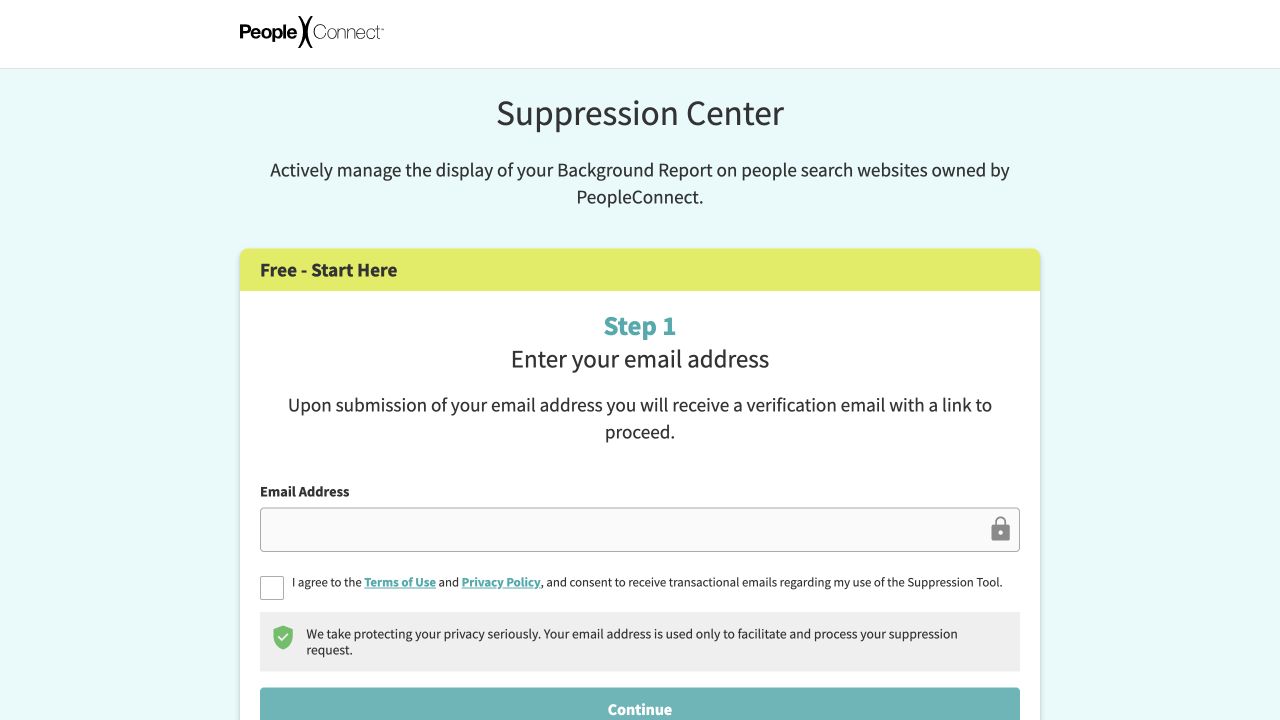
This is the same entry screen used by the four PeopleConnect guides, not a separate broker-branded form. Email verification and later suppression screens are not pictured. No email was entered or request submitted.
Source: https://suppression.peopleconnect.us/loginSelect the image to view it at full size.
How to check whether it worked
Use the estimate above as your recheck window (2–3 days after verification). Reopen your saved profile URL and search for your name again. Keep the confirmation and note any remaining matching results.
PeopleConnect says suppression applies to name-search background reports on Intelius, TruthFinder, Instant Checkmate, and US Search. Check US Search again and review the source for any change in coverage.
Having trouble with US Search removal?
Check name searches and other lookup types separately: PeopleConnect says suppression has different coverage for phone, address, and email reports. PeopleConnect says suppression does not remove information from third-party sources and may not cover certain reverse-lookup reports.
Email verification finished but I still appear
Check whether you saved the suppression or visibility setting after matching your identity. Email verification alone may not change that setting.
Only some lookup types changed
Read the coverage section below. Name-search suppression and reverse lookups have different limits; record the exact remaining report for follow-up.
Keep the submitted URL, confirmation and request date together. Compare the remaining result with the record you requested; a second profile or a stale search snippet may need a different action.
What PeopleConnect suppression covers
PeopleConnect says its free tool covers name-search background reports on Intelius, TruthFinder, Instant Checkmate and US Search. Information may remain in phone, address or email reports and in third-party sources. Classmates is excluded.
Read the scope and exceptions ↗The PeopleConnect.us privacy policy describes information supplied through its own site; each sister site maintains a separate policy.
California residents can also review the state’s DROP deletion platform. Its scope and exemptions differ from name-search suppression.
US Search opt-out questions
Does this also cover other sites besides US Search?
PeopleConnect says its suppression tool covers name-search background reports across Intelius, TruthFinder, Instant Checkmate, and US Search.
Does suppressing US Search delete the underlying public record?
No. PeopleConnect says the tool does not affect information held by third-party sources.
Is the PeopleConnect suppression tool free?
Yes. PeopleConnect states that its suppression tool is free.
Sources and review notes
PeopleConnect’s published suppression scope was checked November 12, 2026; the full interactive flow still needs independent testing. Competitor walkthroughs inform the instructions and estimates; they do not establish that NexSec tested the live form. An entry screenshot verifies only the screen shown, not later verification or removal.
We also compared Serus, Optery, Encovert and DeleteMe. Their verification instructions differ; use the current form where screens disagree.
Something changed? Report a broken step. General information, not legal advice.
Other opt-out guides
Choose another site where you found a matching listing.
Browse all 53 guides →