B2B contact and sales-intelligence database · United States
Professional profile removal
Cognism opt out: remove your professional profile
Cognism’s privacy portal separates “Delete my data” from “Do not sell.” Select the outcome you want and provide the business details the live form requires for matching and verification.
Opens cognism.privacy.saymine.io in a new tab. Check the destination before entering personal information.
Research draft · Not end-to-end tested. Genuine entry screens are available below, not proof of completed removal. Review the evidence and limitations.
- Method
- Data-subject request portal
- Prepare
- Country/state and required business identifiers
- Estimated processing time
- Allow up to about 30 days; provisional
- Cost
- Free privacy request
DeleteMe’s September 2026 guide reports a 30-day window but shows an older form. Cognism’s policy instead refers to applicable response timeframes. The new portal’s timing has not been independently measured. See sources.
Before you open the request page
- Have ready
- Country/state and required business identifiers
- Don’t stop too early
- Submit the intended request type and complete any further verification Cognism requires.
- What this does not prove
- Deletion, do-not-sell, correction and access are different portal choices.
This guide does not submit a request for you. Enter personal details only in the broker’s current privacy process; do not post them in a public support message. If the live form differs, pause and check its instructions.
Work identity, not just your name
Match the right work profile.
Choose the right request type before entering business details: deleting data and opting out of sale are separate choices.
Your private reference notes
- Profile URL and employer shown
- Which work email the record lists
- Whether you still have access to that inbox
Keep these notes yourself. This page does not ask you to connect a mailbox or enter work details.
Remove your Cognism profile
Keep this guide open while using the request page in another tab. Tick boxes are a reading aid only: they do not submit a request or verify removal. Progress resets when you leave or reload.
1.Open the portal from Cognism’s FAQ
The official FAQ links to its hosted privacy center; do not use a sales-demo form.
2.Set the actual country and state
Selecting United States reveals a state field. Use your own residence when submitting.
3.Choose the request type
Deletion, do-not-sell, correction and data access are distinct choices in the captured form.
4.Complete and retain the request
Review required business identifiers, submit only accurate information and keep the processing email. Cognism may request further verification.
Real page captures
What the official process looks like
These are genuine screenshots of the named official system. They document only the screens shown—not an end-to-end removal test. Live screens can change.
Choose deletion or another privacy right
Captured · Request choices only
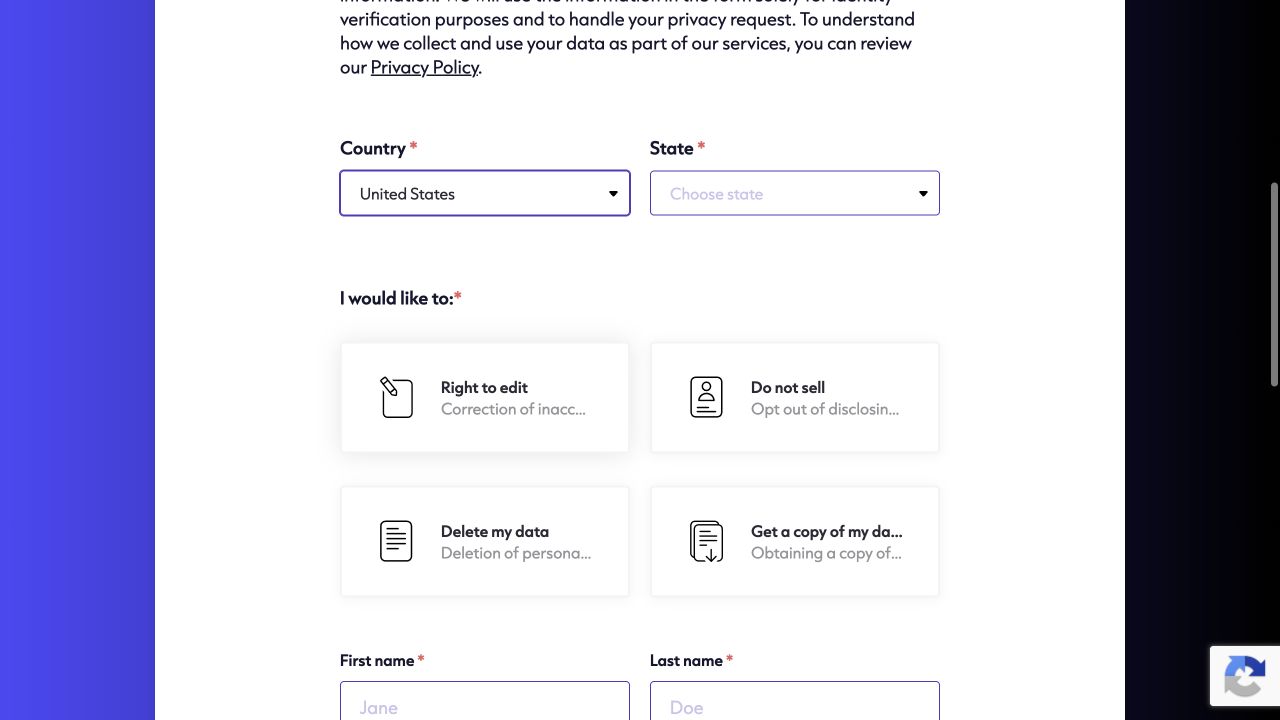
Genuine portal reached through Cognism’s official FAQ. United States was selected solely to demonstrate the US form; state, identity fields and request type were left blank. Visible sample names are form placeholders. Nothing was submitted.
Source: https://cognism.privacy.saymine.io/cognismSelect the image to view it at full size.
Recheck the professional profile
If you have a profile URL, return to the profile and employer you recorded before submitting. Otherwise, track the written outcome and the business identifiers it covers. A confirmation for one email or record does not prove every version is gone.
Record the selected right, submission date and any verification exchange. Ask for clarification if the response only acknowledges receipt without explaining what happened to your data.
Having trouble with Cognism removal?
The captured form asks for multiple business identifiers, including contact and LinkedIn details. Review the live requirements before disclosing them; use privacy@cognism.com if you need to discuss an inaccessible field.
I cannot access the old work inbox
Use the privacy contact or alternative-verification instructions in the broker’s current policy. Do not use a former employer’s credentials or ask someone to forward a verification token.
I received a no-match or profile-edit response
Compare the company, profile and email the response concerns. An edit, no-match or block-list result is not proof that the profile you found was removed.
Keep the submitted URL, confirmation and request date together. Compare the remaining result with the record you requested; a second profile or a stale search snippet may need a different action.
Cognism opt-out questions
Is “Do not sell” the deletion option?
No. The portal labels them as separate request types.
Why does the portal use saymine.io?
That is the hosted destination linked by Cognism’s official FAQ when checked for this guide.
Does this stop every company contacting me?
Cognism’s policy says its customers are separate controllers with their own privacy options.
Sources and review notes
Official FAQ link and live portal inspected and captured November 13, 2026; complete request testing pending. Competitor walkthroughs inform the instructions and estimates; they do not establish that NexSec tested the live form. An entry screenshot verifies only the screen shown, not later verification or removal.
- Cognism official linked privacy portal ↗
- Cognism: official FAQ linking the privacy portal ↗
- Cognism: privacy policy, verification and customer scope ↗
- DeleteMe: older Cognism workflow and timing, September 2026 ↗
Something changed? Report a broken step. General information, not legal advice.
Other opt-out guides
Choose another site where you found a matching listing.
Browse all 53 guides →