Professional email and phone database · United States
Professional profile removal
ContactOut opt out: remove your professional profile
ContactOut’s removal process starts by verifying an email address. Use the dedicated opt-out page, complete its verification instructions and retain the outcome for the profile you want removed.
Opens contactout.com in a new tab. Check the destination before entering personal information.
Research draft · Not end-to-end tested. Genuine entry screens are available below, not proof of completed removal. Review the evidence and limitations.
- Method
- Email-verification request
- Prepare
- Relevant email inbox and profile reference if known
- Estimated processing time
- About 24 hours; subject to verification
- Cost
- Free privacy request
ContactOut’s entry page says it will identify the record and delete the profile within the next 24 hours. The email-only stages were not tested, so do not start that estimate before completing the required verification. See sources.
Before you open the request page
- Have ready
- Relevant email inbox and profile reference if known
- Don’t stop too early
- Complete email verification and retain the resulting outcome message.
- What this does not prove
- Only the entry page was observed; later screens and completion have not been tested.
This guide does not submit a request for you. Enter personal details only in the broker’s current privacy process; do not post them in a public support message. If the live form differs, pause and check its instructions.
Work identity, not just your name
Match the right work profile.
Email verification starts the request. A screenshot of the entry page is not proof that a matching profile was removed.
Your private reference notes
- Profile URL and employer shown
- Which work email the record lists
- Whether you still have access to that inbox
Keep these notes yourself. This page does not ask you to connect a mailbox or enter work details.
Remove your ContactOut profile
Keep this guide open while using the request page in another tab. Tick boxes are a reading aid only: they do not submit a request or verify removal. Progress resets when you leave or reload.
1.Use the dedicated opt-out page
The correct entry is headed “Verify your email,” not a recruiting or sales signup.
2.Request and complete verification
Provide the relevant email, complete the live security check and follow the message. Do not assume requesting the email completes removal.
3.Keep proof and check the result
Retain the final message and compare it with the original profile after the stated estimate.
Real page captures
What the official process looks like
These are genuine screenshots of the named official system. They document only the screens shown—not an end-to-end removal test. Live screens can change.
Begin on ContactOut’s verification page
Captured · Entry screen only
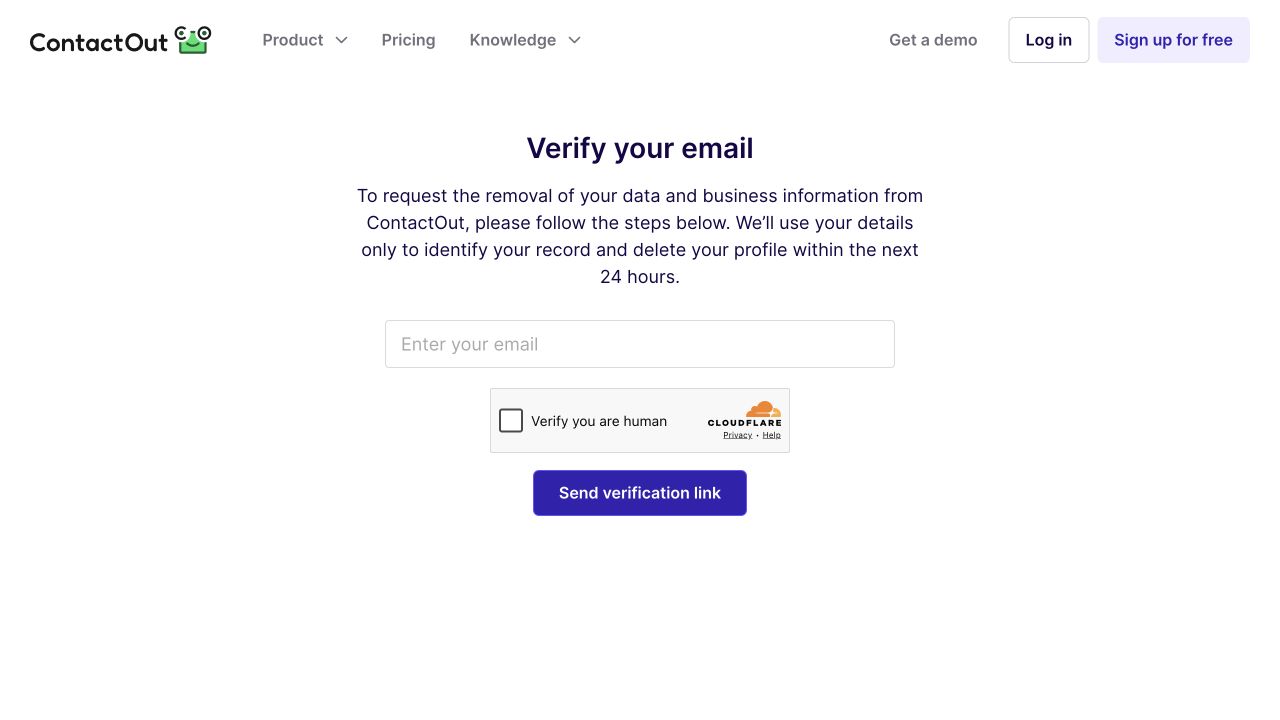
Genuine ContactOut opt-out entry screen with its published 24-hour timing text. No email was entered, the security challenge was not solved and the verification link was not requested.
Source: https://contactout.com/optoutSelect the image to view it at full size.
Recheck the professional profile
If you have a profile URL, return to the profile and employer you recorded before submitting. Otherwise, track the written outcome and the business identifiers it covers. A confirmation for one email or record does not prove every version is gone.
Make a private note of which work address or profile the request concerned. If a second record remains, describe that exact record when following up rather than sending a generic repeat request.
Having trouble with ContactOut removal?
The entry page does not show what happens after email verification. This guide does not invent later button labels or claim that an untested confirmation screen was observed.
I cannot access the old work inbox
Use the privacy contact or alternative-verification instructions in the broker’s current policy. Do not use a former employer’s credentials or ask someone to forward a verification token.
I received a no-match or profile-edit response
Compare the company, profile and email the response concerns. An edit, no-match or block-list result is not proof that the profile you found was removed.
Keep the submitted URL, confirmation and request date together. Compare the remaining result with the record you requested; a second profile or a stale search snippet may need a different action.
ContactOut opt-out questions
Does the screenshot show successful removal?
No. It shows the real empty email-verification entry form only.
Should I create a ContactOut account?
The inspected opt-out entry offers email verification without an account-signup step.
What if the email never arrives?
Check the entered address and spam folder, then use ContactOut’s current privacy contact route if needed.
Sources and review notes
Official opt-out entry inspected and captured November 13, 2026; email verification and completion testing pending. Competitor walkthroughs inform the instructions and estimates; they do not establish that NexSec tested the live form. An entry screenshot verifies only the screen shown, not later verification or removal.
Something changed? Report a broken step. General information, not legal advice.
Other opt-out guides
Choose another site where you found a matching listing.
Browse all 53 guides →